Your Team's AI Context Hub

Stop wasting hours re-explaining your brand to every AI tool. Organize once. Share everywhere. Keep everyone aligned.

Works with Claude, ChatGPT, Gemini, Perplexity, Grok, and every AI assistant your team uses.

Works with

Claude AIChatGPTPerplexity AIGoogle GeminiGrok
+Any AI Tool

AI Context Keeper and/or its various product brands are not associated with or sponsored by any of the above companies.
See Your AI Context Hub in Action

A powerful workspace designed for teams who need to organize, manage, and share AI context effortlessly.

aicontextkeeper.com
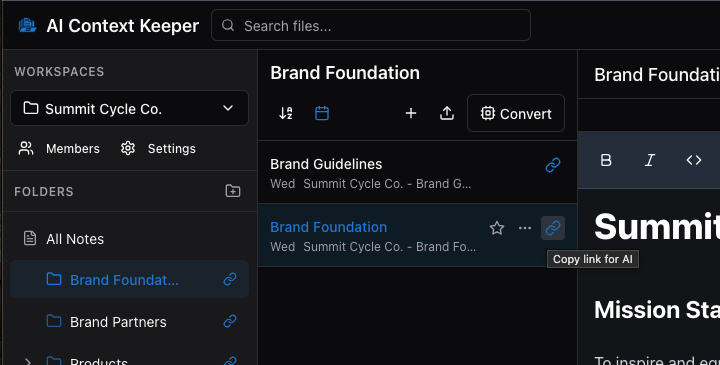
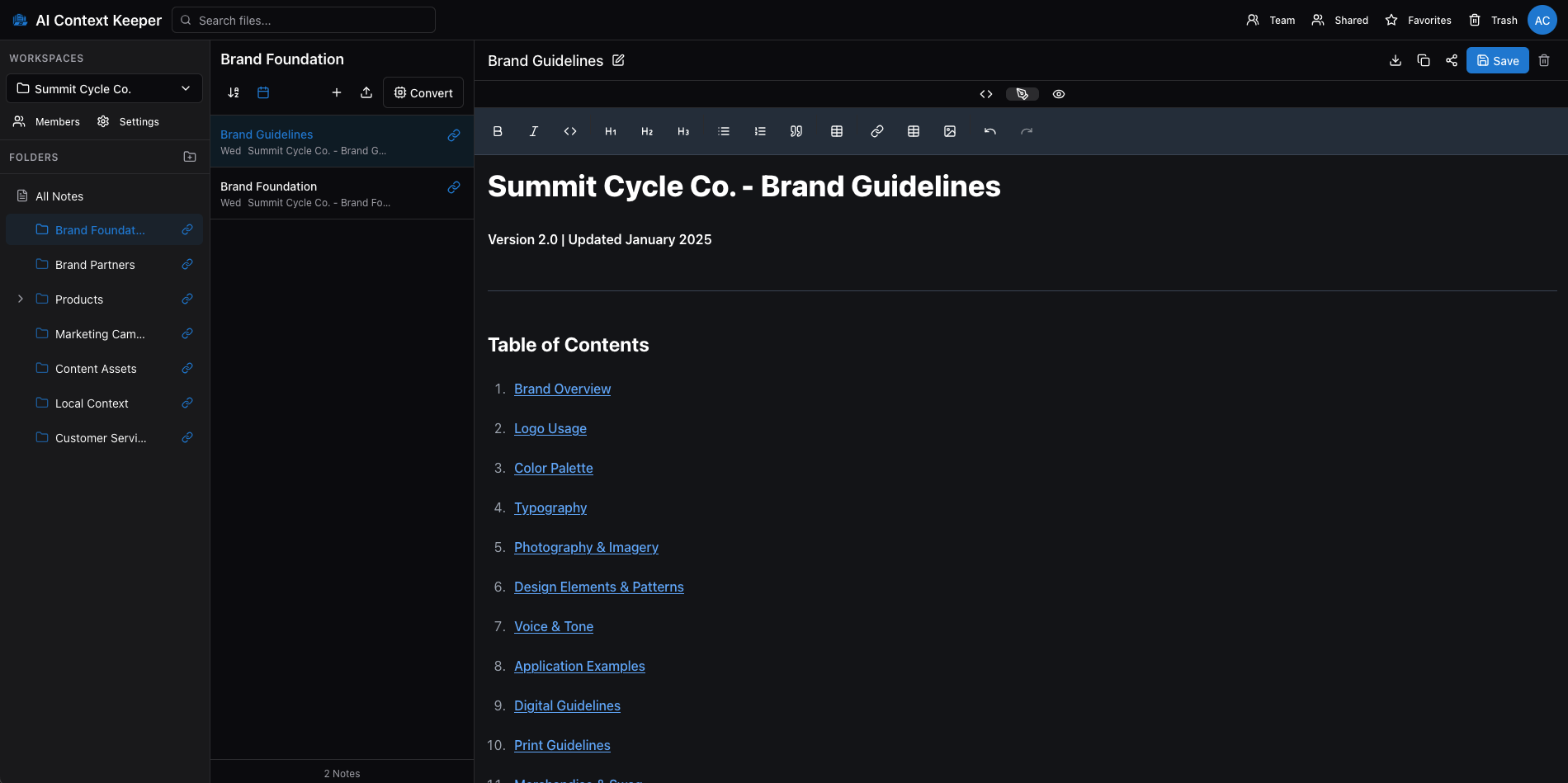
AI Context Keeper - Full application interface showing file management system with folders, notes, and rich text editor
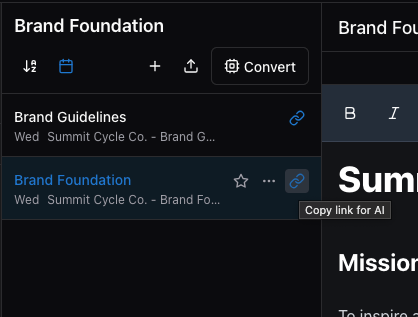
Copy link for AI feature

One-Click AI Sharing

Copy link. Paste in any AI. Done.

Organized workspace view

Organized Workspaces

Folders, files, and notes - all searchable

Is Your Team Stuck in the AI Context Chaos?

Copy-Paste Marathon Every Day

Your team wastes hours copying brand guidelines into ChatGPT, re-uploading product docs to Claude, and explaining context over and over—just to get AI-generated content that's remotely on-brand.

Inconsistent AI Outputs Across Your Team

Sarah's AI writes one way. Mike's writes another. Your brand voice fragments across dozens of AI conversations because everyone's feeding different context—or worse, none at all.

Trapped in Platform Silos

You've uploaded context to Claude Projects. Then someone needs ChatGPT. Now you're starting over, managing the same information across five different AI tools, wondering why this is so complicated.

There's a better way.

One Context Library. Every AI Tool. Everyone Aligned.

We understand. You're managing more AI tools than ever. Your team needs speed. Your brand needs consistency. And nobody has time to become a context management expert.

That's why we built AI Context Keeper — the professional platform for teams who need their AI tools to work together, not fight each other.

Works With Every AI Platform

One URL works everywhere. Share context with Claude, ChatGPT, Gemini, Perplexity, Grok, or any AI assistant—without re-uploading or copy-pasting.

The result: Your team uses the best AI tool for each job, while maintaining consistent context across all of them.

Shared Workspaces & Permissions

Create dedicated workspaces for marketing, sales, product, and every team function. Control who sees what. Ensure everyone uses the same brand scripts, product docs, and knowledge libraries.

The result: Brand consistency across every AI interaction, from every team member, automatically.

Folder Structures That Match Your Workflow

Nested folders, searchable libraries, and markdown-native organization. Build hierarchies that make sense for your business—not a dumping ground of random files.

The result: Find exactly what you need in 5 seconds, not 5 minutes of scrolling.

Three Simple Steps to Transform Your AI Workflow

Get your entire team sharing consistent context in under 10 minutes.

1

Upload Your Context

Drag and drop your existing files—Word docs, PDFs, spreadsheets, presentations, or create new markdown documents. Our advanced conversion engine automatically transforms everything into AI-optimized markdown format.

2

Organize in Workspaces

Create dedicated workspaces for different teams or projects. Build folder structures that mirror your actual workflows. Tag, categorize, and search—everything stays organized and findable.

3

Share Instantly With Any AI Tool

Copy a shareable URL for any file or entire folder. Paste into Claude, ChatGPT, Gemini, Perplexity, Grok, or any AI tool. Your context loads instantly—no uploads, no copy-paste marathons.

That's it. Your team now has a single source of truth for AI context. Everyone stays aligned. Every AI tool stays informed. You stay productive.

New: Chrome Extension

Save AI Content Without Leaving Your Workflow

The Chrome extension brings your workspace directly into your AI conversations. Save outputs with one click. Copy share links instantly. Build your knowledge base as you work.

One-Click Save

When AI generates markdown content, a "Save to ACK" button appears inline. Save directly to any workspace or folder.

Right-Click Anywhere

Highlight any text on any webpage, right-click, and save. Perfect for prompts, explanations, and research from any site.

Copy Share Links Fast

Browse your files and copy share links without leaving your AI chat. Copy entire folders of context with one click.

Works with Claude, ChatGPT, Gemini, Perplexity, and Grok

Get the Extension

Choose Your Plan

Less than one AI subscription. Works with all of them.

Most professionals spend $20-60/month on AI tools. AI Context Keeper has a free Basic plan and makes all your AI tools more effective—by giving them the context they need to serve you better.

Free

Basic Plan

For individual users exploring AI context management

Free
No credit card required
  • 3GB Storage
  • 1 Workspace
  • Single-level folders
  • Share files & folders with any AI tool
  • Advanced file conversion (15+ formats)
  • Unlimited sharing links
For Growing Teams

Premium Plan

For professionals with unlimited needs

$19.99/month
or $199.99/year
Two months FREE - Save $40
  • 50GB Storage
  • Unlimited Workspaces
  • Unlimited folder nesting
  • Share files and folders with any AI tool
  • Advanced file conversion (15+ formats)
  • Team collaboration (includes 10 team members)
  • Granular permission controls

Need more team members? Add additional seats for just $2/month per member.

Basic plan free, no credit card required
AES-256 encrypted at rest
Cancel anytime, no questions asked
Your data exports easily if you leave

See How Teams Like Yours Are Winning With AI Context Keeper

From hours of frustration to seconds of productivity—here's what becomes possible.

Marketing Teams

Maintain Brand Consistency Across Every AI Interaction

Store your brand scripts, messaging frameworks, product positioning, voice & tone guidelines, and campaign templates in one marketing workspace. When anyone asks an AI to draft content, they paste one URL—ensuring every output is on-brand, on-message, and on-target.

Learn more about AI Context Keeper for Marketing

Sales Teams

Give Your Entire Sales Organization the Same Product Knowledge

Organize product specifications, competitive battle cards, objection handlers, case studies, and proposal templates in shared folders. Whether reps use ChatGPT for email drafts or Claude for proposal writing, everyone works from the same playbook.

Development Teams

Stop Re-Explaining Your Codebase Architecture

Maintain system architecture documents, API specifications, coding standards, design decisions, and onboarding materials in organized folders. Share relevant context with GitHub Copilot, Cursor, Claude Code, or any AI coding assistant instantly.

Agencies & Consultants

Manage Multiple Client Contexts Without the Chaos

Create separate workspaces for each client with controlled access permissions. Keep every client's brand guidelines, product info, and project materials isolated and organized. Switch contexts in two clicks.

Learn more about AI Context Keeper for Agencies

The Hidden Cost of Not Having a Context Management System

Every day without AI Context Keeper, your team is losing time, money, and consistency.

10+ hours

per week wasted

The average professional spends over 10 hours weekly managing AI context—finding files, copying information, re-explaining brand guidelines, and correcting off-brand AI outputs.

Translation: $26,000+ in wasted labor costs per employee annually

37%

off-brand content

When teams lack centralized context, over a third of AI-generated content misses your brand voice, tone, or messaging. This leads to the "frankenbrand" problem.

Translation: Damaged brand equity and lower conversion rates

$240+

per person yearly

Most teams pay for multiple AI subscriptions ($20/month each), then still can't easily share context between them. You're locked into specific platforms.

Translation: You're paying more to be less flexible

Stop losing time, money, and consistency. There's a better way to work with AI.

Imagine Your Team Working Like This

This is what becomes possible when your AI context is organized, shared, and consistent.

Marketing Manager - Monday Morning

Before
  • It's 9 AM Monday
  • Spend 20 min finding product brief
  • Copy-paste brand guidelines again
  • Creative momentum gone
After
  • It's 9 AM Monday
  • Paste workspace URL
  • "Create a campaign brief"
  • On-brand brief in 90 seconds

Sales Rep - Customer Call Prep

Before
  • Big prospect call in an hour
  • Scramble through Slack, Drive, email
  • Feed AI partial information
  • Talking points miss key points
After
  • Big prospect call in an hour
  • Paste Product Knowledge URL
  • "Prep me for this call"
  • AI has complete context

Developer - Code Review

Before
  • New dev submits a PR
  • AI doesn't know your patterns
  • Suggestions violate architecture
  • Time wasted explaining issues
After
  • New dev submits a PR
  • Share Architecture folder
  • AI knows your patterns
  • Suggestions fit your system

Agency Team - Client Handoff

Before
  • Team member goes on vacation
  • Another designer picks it up
  • Hour spent hunting guidelines
  • First draft misses preferences
After
  • Team member goes on vacation
  • Click into Client Workspace
  • Share folder with AI tool
  • First draft hits the mark

This isn't fantasy. This is what your team's workflow looks like with AI Context Keeper.
Professional. Organized. Consistent. Fast.

Why Teams Choose AI Context Keeper Over the Alternatives

We're not the only solution. We're just the best one for teams who need their AI tools to work together.

AI Context KeeperClaude ProjectsNotionGoogle Drive
Works with any AI toolClaude onlyManual copy/pasteManual copy/paste
One-click URL sharingMust re-uploadParagraph by paragraphDownload then upload
Team workspacesIndividual only
Built for AI contextGeneral docsFile storage
Advanced file conversionManualLimitedNo
Monthly costFree - $19.99$20.00$15/user$12/user

See detailed comparisons

💡 The Math: Most teams already pay $20-40/month per person for AI subscriptions. AI Context Keeper starts free and makes ALL those AI tools more effective. You're not adding another expense—you're multiplying the value of what you already pay for.

Advanced File Conversion: Your Files, AI-Optimized Automatically

Don't let file formats slow you down. Upload anything—we'll convert it to AI-friendly markdown.

Why This Matters

AI-Optimized Format

AI tools work best with clean, structured markdown. But your team's knowledge is locked in Word docs, PDFs, spreadsheets, and various file formats.

Smart Structure Preservation

We don't just extract text—we preserve headings, lists, tables, and document hierarchy so AI tools understand the structure.

Two Ways to Convert

File Upload: Drag and drop any supported file. URL Conversion: Paste a URL to any public web page or YouTube video.

Supported File Types

PDF files
Word (.docx)
Apple iWork
Excel & CSV
HTML files
RTF & text files
YouTube transcripts
Web pages (via URL)
JSON & XML
EPUBs & more

Use 70% Fewer Tokens. Work Within AI Limits Longer.

Markdown isn't just cleaner—it's dramatically more efficient. Get more context into every AI conversation.

The Token Problem Nobody Talks About

The Hidden Limit

Every AI tool has a maximum context window measured in tokens. Upload a Microsoft Word document or PDF, and you're burning tokens on formatting overhead, embedded metadata, and structural bloat—often using 3-5x more tokens than necessary for the same information.

The result: You hit token limits faster, can't share as much context, and have to split conversations awkwardly just when you need AI's help most.

Why This Matters for Teams

When you're feeding AI your brand guidelines, product specs, and project context simultaneously, every wasted token means:

  • Less room for actual content
  • More conversations split across multiple chats
  • Incomplete context leading to worse AI outputs
  • Constantly bumping into "context too long" errors

How Markdown Changes Everything

Pure Content, Zero Bloat

Markdown contains only the content and basic structure—no hidden formatting layers, no embedded fonts, no metadata overhead. A 50-page Word document might consume 75,000 tokens. The same content in markdown? Usually 25,000-30,000 tokens.

Better AI Comprehension

AI models are trained extensively on markdown. They understand markdown structure natively, leading to better interpretation of hierarchies, lists, emphasis, and document organization—which means better outputs.

More Context in Every Conversation

With 70% fewer tokens used for the same information, you can share complete product catalogs instead of single sheets, include full brand guidelines plus templates, and give AI your entire knowledge base—not just fragments.

Real Example: Token Comparison

Same Document, Different Formats:

FormatFile SizeTokens UsedEfficiency
Word (.docx)245 KB68,000 tokens⚠️ Hits limits fast
PDF892 KB71,000 tokens⚠️ Worst efficiency
Google Doc198 KB65,000 tokens⚠️ Still bloated
Markdown12 KB22,000 tokens✅ 3x more efficient

What this means: For the same AI context window, you can fit 3 markdown documents versus 1 Word document. Your team can share comprehensive context without compromise.

Universal Format, Maximum Efficiency

We automatically convert your existing files to markdown not just for compatibility—but for token efficiency. Every conversion strips formatting bloat while preserving meaning.

Share More, Use Less

When you share a folder URL containing 10 markdown documents, you're giving AI rich, comprehensive context. The same 10 documents as PDFs might exceed token limits before AI even reads them all.

Future-Proof Your Context

As AI models evolve, markdown remains the universal standard. Your context library stays efficient and compatible regardless of which new AI tools emerge.

💡 For Technical Teams: Markdown's token efficiency comes from plain text structure (no binary overhead), semantic formatting (headers, lists, emphasis only), no embedded objects or metadata, and direct tokenization without preprocessing. This means predictable token usage, faster AI processing, and consistent cross-platform behavior.

Other platforms upload files and hope for the best.

AI Context Keeper converts everything to token-optimized markdown, ensuring you get maximum context into every AI conversation—without hitting limits or compromising completeness.

Your team shares more comprehensive context, gets better AI outputs, and never has conversations interrupted by "context too long" errors.

Questions? We've Got Answers.

Everything you need to know about AI Context Keeper

Ready to Stop Wasting Time on AI Context Management?

Join teams who've eliminated hours of copy-pasting and re-explaining by centralizing their AI context in one professional workspace.

Universal AI compatibility
Team collaboration
Professional organization
Advanced file conversion
One-click sharing
14-day free trial, no credit card
No credit card required
AES-256 encrypted
Set up in 5 minutes
Cancel anytime